Search This Blog

Monday, February 11, 2013

driving_site hint


 In a true distributed query, the optimization is done on the sending site. 
 Because your local site may not have access to the CBO statistics on the remote site, Oracle "punts" and does a full-table scan, and this is likely the cause of your full scan.

The driving_site hint forces query execution to be done at a different site than the initiating instance.
This is done when the remote table is much larger than the local table and you want the work (join, sorting) done remotely to save the back-and-forth network traffic.

select /*+DRIVING_SITE(r)*/
   columnNames,.....
from
  localTable        l,
  huge_Remote_table@dblink_xyz r
where
   l.columnName_XX = r.columnName_XX;


Saturday, September 29, 2012

Invisible Indexes (11g)


An invisible index is invisible to the optimizer as default.

Using this feature we can test a new index without effecting the execution plans of the existing sql statements or we can test the effect of dropping an index without dropping it.

create index <IndexName> on <TableName> (<columnNames>) invisible;

USER_INDEXES has a new column named VISIBILITY to indicate whether the index is visible or not.

select index_name,VISIBILITY from user_indexes where index_name=<INDEX NAME>;

There is a new initialization parameter modifiable at system or session level called OPTIMIZER_USE_INVISIBLE_INDEXES. 

This parameter is FALSE as default, meaning the optimizer will not consider invisible indexes when evaluating alternative execution plans.

We can alter an existing index to become invisible or visible.

alter index <IndexName> visible;

alter index <IndexName> invisible;

Generate the Explain Plan and we don't see that the Invisible index used.

Now alter the session parameter : optimizer_use_invisible_indexes=true

alter session set optimizer_use_invisible_indexes=true;

generate the Explain Plan and we can see that the Invisible index used.

Example :

Create table kk_invisibleIndex_test_tab ( x number, y number, z number);

insert into kk_invisibleIndex_test_tab
select  level,level+1,level+2
from    dual
connect by level <= 100000 ;
commit;

select * from kk_invisibleIndex_test_tab where z=300;

Plan
SELECT STATEMENT  ALL_ROWSCost: 105  Bytes: 156  Cardinality: 4    
    1 TABLE ACCESS FULL TABLE KK_INVISIBLEINDEX_TEST_TAB Cost: 105  Bytes: 156  Cardinality: 4
 
create index kk_Invisible_index on kk_invisibleIndex_test_tab (z) INVISIBLE;

select index_name,Index_type,table_name,visibility from user_indexes where index_Name='KK_INVISIBLE_INDEX';

INDEX_NAME                 INDEX_TYPE        TABLE_NAME                                     VISIBILITY
KK_INVISIBLE_INDEX       NORMAL             KK_INVISIBLEINDEX_TEST_TAB   INVISIBLE

select * from kk_invisibleIndex_test_tab where z=300;

Plan
SELECT STATEMENT  ALL_ROWSCost: 105  Bytes: 156  Cardinality: 4    
    1 TABLE ACCESS FULL TABLE KK_INVISIBLEINDEX_TEST_TAB Cost: 105  Bytes: 156  Cardinality: 4

alter session set optimizer_use_invisible_indexes = true;

select * from kk_invisibleIndex_test_tab where z=300;

Plan
SELECT STATEMENT  ALL_ROWSCost: 2  Bytes: 39  Cardinality: 1        
    2 TABLE ACCESS BY INDEX ROWID TABLE KK_INVISIBLEINDEX_TEST_TAB Cost: 2  Bytes: 39  Cardinality: 1    
        1 INDEX RANGE SCAN INDEX KK_INVISIBLE_INDEX Cost: 1  Cardinality: 1

alter session set optimizer_use_invisible_indexes = false;

select * from kk_invisibleIndex_test_tab where z=300;


Plan
SELECT STATEMENT  ALL_ROWSCost: 105  Bytes: 156  Cardinality: 4    
    1 TABLE ACCESS FULL TABLE KK_INVISIBLEINDEX_TEST_TAB Cost: 105  Bytes: 156  Cardinality: 4
   

alter index kk_Invisible_index VISIBLE;


select index_name,Index_type,table_name,visibility from user_indexes where index_Name='KK_INVISIBLE_INDEX';


INDEX_NAME                 INDEX_TYPE        TABLE_NAME                                     VISIBILITY
KK_INVISIBLE_INDEX       NORMAL             KK_INVISIBLEINDEX_TEST_TAB    VISIBLE

Tuesday, September 11, 2012

DBMS_PROFILER (PL/SQL)


The dbms_profiler package is a built-in set of procedures to capture performance information from PL/SQL.

1. dbms_profiler.start_profiler
2. dbms_profiler.flush_data
3. dbms_profiler.stop_profiler

The basic idea behind profiling with dbms_profiler is for the developer to understand where their code is spending the most time, so they can detect and optimize it.

Once you have run the profiler, Oracle will place the results inside the dbms_profiler tables.

The dbms_profiler procedures are not a part of the base installation of Oracle.

$ORACLE_HOME/rdbms/admin directory
proftab.sql - Creates three tables and a sequence and must be executed before the profload.sql file.

profload.sql - Creates the package header and package body for DBMS_PROFILER.  This script must be executed as the SYS user.


1. Starting a Profiling Session

    dbms_profiler.start_profiler ('Performance Test of a pl/sql block');


2. Flushing Data during a Profiling Session

   The flush command enables the developer to dump statistics during program execution without stopping the profiling utility. The only other time Oracle saves data to the underlying tables is when the profiling session is stopped


    dbms_profiler.flush_data();

3. Stopping a Profiling Session
 
   Once the developer stops the profiler, all the remaining (unflushed) data is loaded into the profiler tables.

    dbms_profiler.stop_profiler();


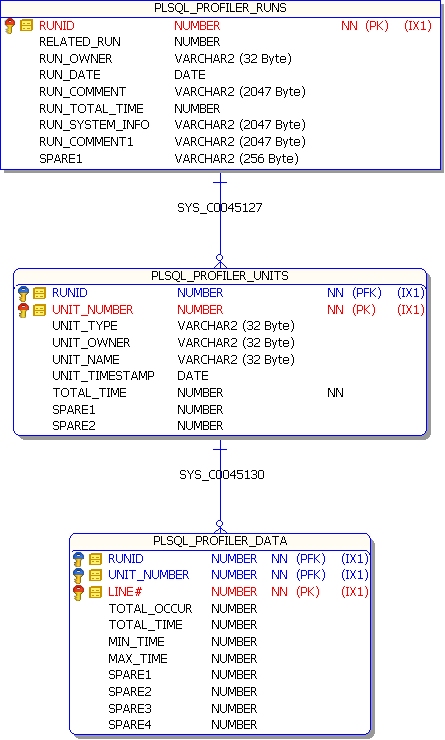
Profiler Data saves to the below set of tables.


1. plsql_profiler_runs

2. plsql_profiler_units

3. plsql_profiler_data


-- Total time spent on each run
select runid,
substr(run_comment,1, 30) as run_comment,
run_total_time/100000000000 as secs
from (select a.runid, sum(a.total_time) run_total_time, b.run_comment
from plsql_profiler_units a, plsql_profiler_runs b
where a.runid = b.runid group by a.runid, b.run_comment )
where run_total_time > 0
order by runid asc;


-- Percentage of time in each module, for each run separately

select p1.runid,
substr(p2.run_comment, 1, 20) as run_comment,
p1.unit_owner,
decode(p1.unit_name, '', '',
substr(p1.unit_name,1, 20)) as unit_name,
p1.total_time/100000000000 as secs,
TO_CHAR(100*p1.total_time/p2.run_total_time, '999.9') as percentage
from plsql_profiler_units p1,
(select a.runid, sum(a.total_time) run_total_time, b.run_comment
from plsql_profiler_units a, plsql_profiler_runs b
where a.runid = b.runid group by a.runid, b.run_comment ) p2
where p1.runid=p2.runid
and p1.total_time > 0
and p2.run_total_time > 0
and (p1.total_time/p2.run_total_time) >= .01
order by p1.runid asc, p1.total_time desc;

-- Percentage of time in each module, summarized across runs

select p1.unit_owner,
decode(p1.unit_name, '', '', substr(p1.unit_name,1, 25)) as unit_name,
p1.total_time/100000000000 as secs,
TO_CHAR(100*p1.total_time/p2.grand_total, '99999.99') as percentage
from plsql_profiler_units_cross_run p1,
plsql_profiler_grand_total p2
order by p1.total_time DESC;


-- Lines taking more than 1% of the total time, each run separate

select p1.runid as runid,
p1.total_time/1000000000 as Hsecs,
p1.total_time/p4.grand_total*100 as pct,
substr(p2.unit_owner, 1, 20) as owner,
decode(p2.unit_name, '', '', substr(p2.unit_name,1, 20)) as unit_name,
p1.line#,
( select p3.text
from all_source p3
where p3.owner = p2.unit_owner and
p3.line = p1.line# and
p3.name=p2.unit_name and
p3.type not in ( 'PACKAGE', 'TYPE' )) text
from plsql_profiler_data p1,
plsql_profiler_units p2,
plsql_profiler_grand_total p4
where (p1.total_time >= p4.grand_total/100)
AND p1.runID = p2.runid
and p2.unit_number=p1.unit_number
order by p1.total_time desc;


-- Number of lines actually executed in different units (by unit_name)

select p1.unit_owner,
p1.unit_name,
count( decode( p1.total_occur, 0, null, 0)) as lines_executed ,
count(p1.line#) as lines_present,
count( decode( p1.total_occur, 0, null, 0))/count(p1.line#) *100
as pct
from plsql_profiler_lines_cross_run p1
where (p1.unit_type in ( 'PACKAGE BODY', 'TYPE BODY',
'PROCEDURE', 'FUNCTION' ) )
group by p1.unit_owner, p1.unit_name;


-- Number of lines actually executed for all units
select count(p1.line#) as lines_executed
from plsql_profiler_lines_cross_run p1
where (p1.unit_type in ( 'PACKAGE BODY', 'TYPE BODY',
'PROCEDURE', 'FUNCTION' ) )
AND p1.total_occur > 0;


-- Total number of lines in all units
SELECT COUNT(p1.line#) AS LINES_PRESENT
FROM plsql_profiler_lines_cross_run p1
WHERE (p1.unit_type in ( 'PACKAGE BODY', 'TYPE BODY',
'PROCEDURE', 'FUNCTION' ) );


Note :
The main resource consumers are those lines that execute SQL.
Once the data is sorted by average execution time, the statements that are the worst usually contain SQL.
Optimize and tune the SQL


Example:

Create or replace function profiler_test_function return number is
begin
  dbms_lock.sleep(10);
  return 100;
end profiler_test_function;
/
show errors;

Create or replace procedure Profiler_test_procedure is
  loopcounter number:=10;
begin
   dbms_output.put_line('Start');
   loop
     dbms_lock.sleep(1);
     dbms_output.put_line(loopcounter);
     loopcounter:=loopcounter-1;
     exit when loopcounter=0;
   end loop;

   loopcounter :=10;
   loop
     dbms_output.put_line(profiler_test_function);
     loopcounter:=loopcounter-1;
     exit when loopcounter=0;
   end loop;

   dbms_output.put_line('End');
end Profiler_test_procedure;
/
show errors;


begin
   dbms_profiler.start_profiler ('Test Run1');
   Profiler_test_procedure;
   dbms_profiler.stop_profiler ;
end;
/

Results:


begin
   dbms_profiler.start_profiler ('Test Run2');
   Profiler_test_procedure;
   dbms_profiler.stop_profiler ;
end;
/

Tuesday, July 31, 2012

Null Within expression


Null within an expression evaluates the complete expression to NULL. ( even on conditional statements )


Example:

declare
   flag1 boolean;
   flag2 boolean;
 begin
  
   flag1 := (null > trunc(sysdate));  --Flag1 evaluates to Null , not to False
  
   flag2 := true;
  
   if  flag1 and flag2 then
     raise_application_error(-20001,'true');
   elsif not flag1 then
     raise_application_error(-20001,'flag1: false , flag2 may be true or false');
   elsif not flag2 then
     raise_application_error(-20001,'flag2: false & flag1 : True');
   else
     raise_application_error(-20001,'case trapped');
   end if;
end;

Wednesday, June 20, 2012

Hash DataSet


Hashing :

1.  If the same DataSet is Passed to HashGenerator, we get the same Hash value out of it.

2. No two different Input Data Sets result in same Hash Value.


Based on above points, we can check if the process needs to be re-done.

Algorithm :

If HashOfTheProcessChanged then
    redo The Process;
else
    skip The Process;
end if;


Code :


 function generatehash (sqlstatement clob)  return varchar2 is
      xmlcontextHandle      DBMS_XMLGEN.CTXHANDLE;
      xml xmltype;
      xmlclob clob;
 begin

      xmlcontextHandle := dbms_xmlgen.newcontext (sqlstatement);

      begin
        xmlclob:=DBMS_XMLGEN.GETXML ( xmlcontextHandle);
      exception
        when others then
           -- close the context to release the resources & close the open cursors
          dbms_xmlgen.closecontext (xmlcontextHandle);
     end;

      dbms_xmlgen.closecontext (xmlcontextHandle);
      return (dbms_crypto.hash (xmlclob, 3));
 exception
    when others then   
         return (null);
 end generatehash;


Note : sqlstatement is the sql string (Can be Dynamic Sql)
          Be sure to use Order by Clause on the SQL Statement.

If Order by Clause not specified the order of the select fetch may change and it makes the hash change

Clob 1 :  (DataSet)
              1, kiran
              2, vishali

Clob 2 :  (DataSet)
              2, vishali
              1, kiran 


Hash on Clob 1 <> Hash on Clob 2

So the Sql Statement must specify the order by Clause to make sure we get the correct hash.


Example :

Select   generatehash  ( ' Select sysdate from dual' ) from dual;


Select   generatehash  ( ' Select ''1A2B3C'' from dual' ) from dual;

Declare 
  sqlStatement varchar2(100):= ' Select sysdate, ''1A2B3C'' from dual' ;
begin
  dbms_output.put_line(  generatehash (sqlStatement) );
end;

Sunday, June 17, 2012

Oracle Table Clustering

Packages

Packages :

1. Specification (required)
2. Body (optional)

(i)   Information hiding : Implementation is hidden in the package body.
(ii)  Public and private : Specification (public) & Body (private).
(iii) Initialization:  package is initialized only once per session.
(iv)  Session persistence : If we establish a session and execute a program that assigns a value to a package-level variable,
                            that variable is set to persist for the length of the session, and it retains its value even if the
                            program that performed the assignment has ended.

Example:

create or replace package test_package
as
my_variable1 number;
my_variable2 varchar2(200);
end;
/

Session 1:
Begin
  test_package.my_variable1:=1;
  test_package.my_variable2:='kiran';
End;
/

Begin
  dbms_output.put_line(test_package.my_variable1);
  dbms_output.put_line(test_package.my_variable2);
End;
/

Session 2:
Begin
  dbms_output.put_line(test_package.my_variable1);
  dbms_output.put_line(test_package.my_variable2);
End;
/

Note:
The first time our session uses a package (whether by calling a program defined in the package, reading or writing a variable, or using a locally declared variable TYPE), Oracle initializes that package.
A package may be reinitialized in a session if that package was recompiled since last use
or
if the package state for our entire session was reset.