Search This Blog

Friday, February 22, 2013

DBMS_XMLGEN


The DBMS_XMLGEN package converts the results of a SQL query to a canonical XML format.

The package takes an arbitrary SQL query as input, converts it to XML format, and returns the result as a CLOB.

DBMS_XMLGEN.CTXHANDLE 

DBMS_XMLGEN.NEWCONTEXT
  Generates a new context handle from a query

DBMS_XMLGEN.CLOSECONTEXT
   This procedure closes a given context and releases all resources associated with it,

DBMS_XMLGEN.GETXML
  This function gets the XML document.
  Gets the XML document by fetching the maximum number of rows specified.
  It appends the XML document to the CLOB passed in

DBMS_XMLGEN.GETXMLTYPE
  Generates the XML document and returns it as a sys.XMLType

DBMS_XMLGEN.GETNUMROWSPROCESSED
   This function retrieves the number of SQL rows processed when generating the XML using the GETXML

DBMS_XMLGEN.RESTARTQUERY
  This procedure restarts the query and generates the XML from the first row.
  It can be used to start executing the query again, without having to create a new context.

DBMS_XMLGEN.SETCONVERTSPECIALCHARS
  This procedure sets whether or not special characters in the XML data must be converted into their escaped XML equivalent.
For example, the < sign is converted to &lt;.
The default is to perform conversions.
This function improves performance of XML processing when the input data cannot contain any special characters such as <, >, ",', which must be escaped.
It is expensive to scan the character data to replace the special characters,particularly if it involves a lot of data.

DBMS_XMLGEN.SETMAXROWS
  This procedure sets the maximum number of rows to fetch from the SQL query result for every invokation of the GETXML.It is used when generating paginated results.

DBMS_XMLGEN.SETNULLHANDLING
  This procedure sets NULL handling options, handled through the flag parameter setting.

  DROP_NULLS CONSTANT NUMBER:= 0; (Default) Leaves out the tag for NULL elements.
  NULL_ATTR CONSTANT NUMBER:= 1; Sets xsi:nil="true".
  EMPTY_TAG CONSTANT NUMBER:= 2; Sets, for example, <foo/>.

DBMS_XMLGEN.SETROWSETTAG
  This procedure sets the name of the root element of the document. The default name is ROWSET.

DBMS_XMLGEN.SETROWTAG
  This procedure sets the name of the element separating all the rows. The default name is ROW.

DBMS_XMLGEN.SETSKIPROWS
This procedure skips a given number of rows before generating the XML output for every call to the GETXML


Example:


declare
 sqlquery varchar2(200):= 'select ''kiran'' fname, ''kodavati'' lname from dual
                                       union all
                                       select ''vishali'' fname,''senivarapu'' lname from dual';

  xmlcontextHandle  dbms_xmlgen.CTXHANDLE;
  xmlclob_1 clob;
  numberofrowsfetched number;
  xmlclob_2 clob;
begin
  dbms_output.put_line(sqlquery);
  xmlcontextHandle:=DBMS_XMLGEN.NEWCONTEXT(sqlquery);
  xmlclob_1:=dbms_xmlgen.getXML(xmlcontextHandle);
  numberofrowsfetched:=dbms_xmlgen.getnumrowsprocessed(xmlcontextHandle);
  dbms_output.put_line(xmlclob_1);
  dbms_output.put_line('numberofrowsfetched:'||numberofrowsfetched);

  dbms_xmlgen.restartQuery(xmlcontextHandle);

  dbms_xmlgen.SETMAXROWS(xmlcontextHandle,1);
  xmlclob_2:=dbms_xmlgen.getXML(xmlcontextHandle);
  dbms_output.put_line(xmlclob_2);
  numberofrowsfetched:=dbms_xmlgen.getnumrowsprocessed(xmlcontextHandle);
  dbms_output.put_line('numberofrowsfetched:'||numberofrowsfetched);


  xmlclob_2:=dbms_xmlgen.getXML(xmlcontextHandle);
  dbms_output.put_line(xmlclob_2);

  numberofrowsfetched:=dbms_xmlgen.getnumrowsprocessed(xmlcontextHandle);
  dbms_output.put_line('numberofrowsfetched:'||numberofrowsfetched);

  dbms_xmlgen.restartQuery(xmlcontextHandle);
  dbms_xmlgen.SETMAXROWS(xmlcontextHandle,2);
  dbms_xmlgen.setRowSetTag(xmlcontextHandle,'DataSet');
  dbms_xmlgen.setRowTag(xmlcontextHandle,'DataRow');
  xmlclob_2:=dbms_xmlgen.getXML(xmlcontextHandle);
  dbms_output.put_line(xmlclob_2);

  dbms_xmlgen.closeContext(xmlcontextHandle);
end;

Thursday, February 21, 2013

XMLType


XMLType is a system-defined type for handling XML data.

You can create columns of XMLType and insert XML documents into it.


Functions and Procedures of XMLType

XMLType(xmlData) -- Constructor

   The actual data in the form of a CLOB, REF cursor, VARCHAR2 or object type.


declare
xmlclob clob:=
'<?xml version="1.0"?>
  <Family>
    <name> kiran </name>
    <name> vishali </name>
  </Family>';
testxmltype xmltype:=xmltype(xmlclob);
begin
  dbms_output.put_line(testxmltype.getclobval());
end;


createXML()
   for creating and returning an XMLType instance.
   The string and clob parameters used to pass in the date must contain well-formed and valid XML documents


existsNode()
   Checks if the node exists.
   If the XPath string is NULL or the document is empty, then a value of 0 is returned, otherwise returns 1.

   Given an XPath expression, checks if the XPath applied over the document can return any valid nodes.

declare
xmlclob clob:=
'<?xml version="1.0"?>
  <Family>
    <name> kiran </name>
    <name> vishali </name>
  </Family>';
testxmltype xmltype:=xmltype(xmlclob);
begin
  dbms_output.put_line(testxmltype.getclobval());
 
  if testxmltype.existsNode('/Family/name')=1 then
    dbms_output.put_line('node exists');
  else
    dbms_output.put_line('node does not exists');
  end if;
 
  if testxmltype.existsNode('//name')=1 then
    dbms_output.put_line('node exists');
  else
    dbms_output.put_line('node does not exists');
  end if;

end;


extract()

   Extracts an XMLType fragment and returns an XMLType instance containing the result nodes.
   If the XPath does not result in any nodes, then returns NULL.


declare
xmlclob clob:=
'<?xml version="1.0"?>
  <Family>
    <name> kiran </name>
    <name> vishali </name>
  </Family>';
testxmltype xmltype:=xmltype(xmlclob);
newxmltype xmltype;
begin
  dbms_output.put_line(testxmltype.getclobval());
 
  newxmltype:=testxmltype.extract('//name');
 
  dbms_output.put_line(newxmltype.getclobval());
 
  newxmltype:=testxmltype.extract('//name/text()');
 
  dbms_output.put_line(newxmltype.getclobval());
 
end;


isFragment()
   Determines if the XMLType instance corresponds to a well-formed document, or a fragment.
   Returns 1 or 0 indicating if the XMLType instance contains a fragment or a well-formed document.
   A fragment is a XML instance, which has more than one root element.


getClobVal()
   Returns a CLOB containing the seralized XML representation

getNumVal()
   Returns a numeric value, formatted from the text value pointed to by the XMLType instance

getStringVal()
   Returns the document as a string.
   Returns s string containing the seralized XML representation, or in case of text nodes, the text itself.

getRootElement()
   Gets the root element of the XMLType instance. Returns NULL if the instance is a fragment.


XML Basics


XML


XML stands for eXtensible Markup Language.
XML is designed to transport and store data.

XML does not DO anything. XML was created to structure, store, and transport information.

XML Documents Form a Tree Structure

<root>
  <child>
    <subchild>.....</subchild>
  </child>
</root>


DOM node tree


XML Tags are Case Sensitive
A "Well Formed" XML document has correct XML syntax.
  • XML documents must have a root element
  • XML elements must have a closing tag
  • XML tags are case sensitive
  • XML elements must be properly nested
  • XML attribute values must be quoted

Sample xml:

<?xml version="1.0" encoding="UTF-16"?>
<note>
<to>kiran</to>
<from>vishali</from>
<heading>Reminder</heading>
<body>Don't forget breakfast this weekend!</body>
</note>

XML DOM


The XML DOM defines a standard way for accessing and manipulating XML documents.

The DOM presents an XML document as a tree-structure.

The XML DOM is a standard for how to get, change, add, or delete XML elements.


According to the DOM, everything in an XML document is a node.

The DOM says:

The entire document is a document node
Every XML element is an element node
The text in the XML elements are text nodes
Every attribute is an attribute node
Comments are comment nodes


A common error in DOM processing is to expect an element node to contain text.

However, the text of an element node is stored in a text node.

The XML DOM views an XML document as a tree-structure. The tree structure is called a node-tree.

All nodes can be accessed through the tree. Their contents can be modified or deleted, and new elements can be created.

The tree starts at the root node and branches out to the text nodes at the lowest level of the tree

The nodes in the node tree have a hierarchical relationship to each other.

The terms parent, child, and sibling are used to describe the relationships.

Parent nodes have children. Children on the same level are called siblings.

In a node tree, the top node is called the root
Every node, except the root, has exactly one parent node
A node can have any number of children
A leaf is a node with no children
Siblings are nodes with the same parent

The XML DOM contains methods (functions) to traverse XML trees, access, insert, and delete nodes.

However, before an XML document can be accessed and manipulated, it must be loaded into an XML DOM object.

The programming interface to the DOM is defined by a set standard properties and methods.

XML DOM Properties

These are some typical DOM properties:
x is a node object.
x.nodeName - the name of x
x.nodeValue - the value of x
x.parentNode - the parent node of x
x.childNodes - the child nodes of x
x.attributes - the attributes nodes of x


XML DOM Methods

x is a node object.
x.getElementsByTagName(name) - get all elements with a specified tag name
x.appendChild(node) - insert a child node to x
x.removeChild(node) - remove a child node from x


getElementsByTagName() returns all elements with a specified tag name.

The getElementsByTagName() method returns a node list. A node list is an array of nodes.

XPath 


XPath is a language for finding information in an XML document.

XPath uses path expressions to select nodes or node-sets in an XML document. These path expressions look very much like the expressions you see when you work with a traditional computer file system.


Selecting Nodes

XPath uses path expressions to select nodes in an XML document. The node is selected by following a path or steps. The most useful path expressions are listed below:
ExpressionDescription
nodenameSelects all nodes with the name "nodename"
/Selects from the root node
//Selects nodes in the document from the current node that match the selection no matter where they are
.Selects the current node
..Selects the parent of the current node
@Selects attributes
In the table below we have listed some path expressions and the result of the expressions:
Path ExpressionResult
bookstoreSelects all nodes with the name "bookstore"
/bookstoreSelects the root element bookstoreNote: If the path starts with a slash ( / ) it always represents an absolute path to an element!
bookstore/bookSelects all book elements that are children of bookstore
//bookSelects all book elements no matter where they are in the document
bookstore//bookSelects all book elements that are descendant of the bookstore element, no matter where they are under the bookstore element
//@langSelects all attributes that are named lang


Predicates

Predicates are used to find a specific node or a node that contains a specific value.
Predicates are always embedded in square brackets.
In the table below we have listed some path expressions with predicates and the result of the expressions:
Path ExpressionResult
/bookstore/book[1]Selects the first book element that is the child of the bookstore element.Note: IE5 and later has implemented that [0] should be the first node, but according to the W3C standard it should have been [1]!!
/bookstore/book[last()]Selects the last book element that is the child of the bookstore element
/bookstore/book[last()-1]Selects the last but one book element that is the child of the bookstore element
/bookstore/book[position()<3]Selects the first two book elements that are children of the bookstore element
//title[@lang]Selects all the title elements that have an attribute named lang
//title[@lang='eng']Selects all the title elements that have an attribute named lang with a value of 'eng'
/bookstore/book[price>35.00]Selects all the book elements of the bookstore element that have a price element with a value greater than 35.00
/bookstore/book[price>35.00]/titleSelects all the title elements of the book elements of the bookstore element that have a price element with a value greater than 35.00


Selecting Unknown Nodes

XPath wildcards can be used to select unknown XML elements.
WildcardDescription
*Matches any element node
@*Matches any attribute node
node()Matches any node of any kind
In the table below we have listed some path expressions and the result of the expressions:
Path ExpressionResult
/bookstore/*Selects all the child nodes of the bookstore element
//*Selects all elements in the document
//title[@*]Selects all title elements which have any attribute


Selecting Several Paths

By using the | operator in an XPath expression you can select several paths.
In the table below we have listed some path expressions and the result of the expressions:
Path ExpressionResult
//book/title | //book/priceSelects all the title AND price elements of all book elements
//title | //priceSelects all the title AND price elements in the document
/bookstore/book/title | //priceSelects all the title elements of the book element of the bookstore element AND all the price elements in the document


Wednesday, February 13, 2013

DML Error Logging


By default, when a DML statement fails the whole statement is rolled back, regardless of how many rows were processed successfully before the error was detected.

 Adding the appropriate LOG ERRORS clause on to most INSERT, UPDATE, MERGE and DELETE statements enables the operations to complete, regardless of errors.

LOG ERRORS [INTO [schema.]table] [('simple_expression')] [REJECT LIMIT integer|UNLIMITED]

The simple_expression is used to specify a tag that makes the errors easier to identify.

For parallel DML operations, the reject limit is applied to each parallel server.


 A log table must be created for every base table that requires the DML error logging functionality.


BEGIN
  DBMS_ERRLOG.create_error_log (dml_table_name => '<tablename>');
END;
/


log table name matches the first 25 characters of the base table with the "ERR$_" prefix


begin
   dbms_errlog.create_error_log ( dml_table_name => 'destinationTab');
end;
/


Insert :


INSERT INTO destinationTab
SELECT *
FROM   sourceTab
LOG ERRORS  ('INSERT') REJECT LIMIT UNLIMITED;


Update :

Update destinationTab set col1=xxx,col2=yyyy,col3=zzzz where id between 1 to 1000
Log Errors ('UPDATE') Reject Limit Unlimited;


Merge :

Merge into destinationTab d
using SourceTab s
on (s.id=d.id)
When matched then 
  update set d.col1=s.col1,d.col2=s.col2
When not matched then
  insert (id,col1,col2) values (s.id,s.col1,s.col2)
Log Errors ('Merge') Reject Limit 10;


Delete :

Delete destinationTab where id between 1 and 1000
Log Errors ('Delete') Reject Limit 100;


Monday, February 11, 2013

driving_site hint


 In a true distributed query, the optimization is done on the sending site. 
 Because your local site may not have access to the CBO statistics on the remote site, Oracle "punts" and does a full-table scan, and this is likely the cause of your full scan.

The driving_site hint forces query execution to be done at a different site than the initiating instance.
This is done when the remote table is much larger than the local table and you want the work (join, sorting) done remotely to save the back-and-forth network traffic.

select /*+DRIVING_SITE(r)*/
   columnNames,.....
from
  localTable        l,
  huge_Remote_table@dblink_xyz r
where
   l.columnName_XX = r.columnName_XX;


Saturday, September 29, 2012

Invisible Indexes (11g)


An invisible index is invisible to the optimizer as default.

Using this feature we can test a new index without effecting the execution plans of the existing sql statements or we can test the effect of dropping an index without dropping it.

create index <IndexName> on <TableName> (<columnNames>) invisible;

USER_INDEXES has a new column named VISIBILITY to indicate whether the index is visible or not.

select index_name,VISIBILITY from user_indexes where index_name=<INDEX NAME>;

There is a new initialization parameter modifiable at system or session level called OPTIMIZER_USE_INVISIBLE_INDEXES. 

This parameter is FALSE as default, meaning the optimizer will not consider invisible indexes when evaluating alternative execution plans.

We can alter an existing index to become invisible or visible.

alter index <IndexName> visible;

alter index <IndexName> invisible;

Generate the Explain Plan and we don't see that the Invisible index used.

Now alter the session parameter : optimizer_use_invisible_indexes=true

alter session set optimizer_use_invisible_indexes=true;

generate the Explain Plan and we can see that the Invisible index used.

Example :

Create table kk_invisibleIndex_test_tab ( x number, y number, z number);

insert into kk_invisibleIndex_test_tab
select  level,level+1,level+2
from    dual
connect by level <= 100000 ;
commit;

select * from kk_invisibleIndex_test_tab where z=300;

Plan
SELECT STATEMENT  ALL_ROWSCost: 105  Bytes: 156  Cardinality: 4    
    1 TABLE ACCESS FULL TABLE KK_INVISIBLEINDEX_TEST_TAB Cost: 105  Bytes: 156  Cardinality: 4
 
create index kk_Invisible_index on kk_invisibleIndex_test_tab (z) INVISIBLE;

select index_name,Index_type,table_name,visibility from user_indexes where index_Name='KK_INVISIBLE_INDEX';

INDEX_NAME                 INDEX_TYPE        TABLE_NAME                                     VISIBILITY
KK_INVISIBLE_INDEX       NORMAL             KK_INVISIBLEINDEX_TEST_TAB   INVISIBLE

select * from kk_invisibleIndex_test_tab where z=300;

Plan
SELECT STATEMENT  ALL_ROWSCost: 105  Bytes: 156  Cardinality: 4    
    1 TABLE ACCESS FULL TABLE KK_INVISIBLEINDEX_TEST_TAB Cost: 105  Bytes: 156  Cardinality: 4

alter session set optimizer_use_invisible_indexes = true;

select * from kk_invisibleIndex_test_tab where z=300;

Plan
SELECT STATEMENT  ALL_ROWSCost: 2  Bytes: 39  Cardinality: 1        
    2 TABLE ACCESS BY INDEX ROWID TABLE KK_INVISIBLEINDEX_TEST_TAB Cost: 2  Bytes: 39  Cardinality: 1    
        1 INDEX RANGE SCAN INDEX KK_INVISIBLE_INDEX Cost: 1  Cardinality: 1

alter session set optimizer_use_invisible_indexes = false;

select * from kk_invisibleIndex_test_tab where z=300;


Plan
SELECT STATEMENT  ALL_ROWSCost: 105  Bytes: 156  Cardinality: 4    
    1 TABLE ACCESS FULL TABLE KK_INVISIBLEINDEX_TEST_TAB Cost: 105  Bytes: 156  Cardinality: 4
   

alter index kk_Invisible_index VISIBLE;


select index_name,Index_type,table_name,visibility from user_indexes where index_Name='KK_INVISIBLE_INDEX';


INDEX_NAME                 INDEX_TYPE        TABLE_NAME                                     VISIBILITY
KK_INVISIBLE_INDEX       NORMAL             KK_INVISIBLEINDEX_TEST_TAB    VISIBLE

Tuesday, September 11, 2012

DBMS_PROFILER (PL/SQL)


The dbms_profiler package is a built-in set of procedures to capture performance information from PL/SQL.

1. dbms_profiler.start_profiler
2. dbms_profiler.flush_data
3. dbms_profiler.stop_profiler

The basic idea behind profiling with dbms_profiler is for the developer to understand where their code is spending the most time, so they can detect and optimize it.

Once you have run the profiler, Oracle will place the results inside the dbms_profiler tables.

The dbms_profiler procedures are not a part of the base installation of Oracle.

$ORACLE_HOME/rdbms/admin directory
proftab.sql - Creates three tables and a sequence and must be executed before the profload.sql file.

profload.sql - Creates the package header and package body for DBMS_PROFILER.  This script must be executed as the SYS user.


1. Starting a Profiling Session

    dbms_profiler.start_profiler ('Performance Test of a pl/sql block');


2. Flushing Data during a Profiling Session

   The flush command enables the developer to dump statistics during program execution without stopping the profiling utility. The only other time Oracle saves data to the underlying tables is when the profiling session is stopped


    dbms_profiler.flush_data();

3. Stopping a Profiling Session
 
   Once the developer stops the profiler, all the remaining (unflushed) data is loaded into the profiler tables.

    dbms_profiler.stop_profiler();


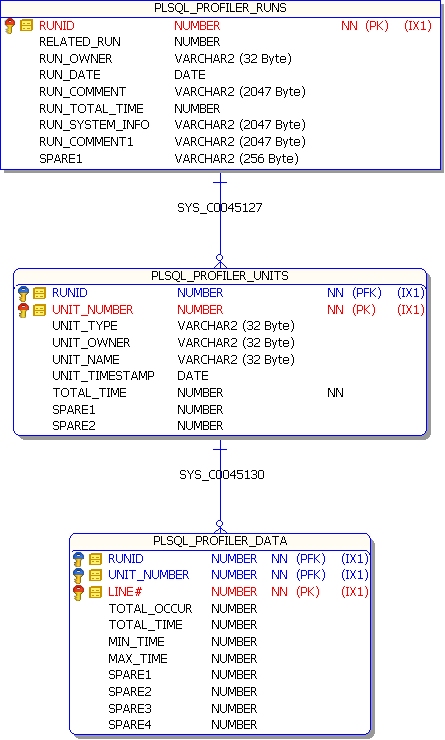
Profiler Data saves to the below set of tables.


1. plsql_profiler_runs

2. plsql_profiler_units

3. plsql_profiler_data


-- Total time spent on each run
select runid,
substr(run_comment,1, 30) as run_comment,
run_total_time/100000000000 as secs
from (select a.runid, sum(a.total_time) run_total_time, b.run_comment
from plsql_profiler_units a, plsql_profiler_runs b
where a.runid = b.runid group by a.runid, b.run_comment )
where run_total_time > 0
order by runid asc;


-- Percentage of time in each module, for each run separately

select p1.runid,
substr(p2.run_comment, 1, 20) as run_comment,
p1.unit_owner,
decode(p1.unit_name, '', '',
substr(p1.unit_name,1, 20)) as unit_name,
p1.total_time/100000000000 as secs,
TO_CHAR(100*p1.total_time/p2.run_total_time, '999.9') as percentage
from plsql_profiler_units p1,
(select a.runid, sum(a.total_time) run_total_time, b.run_comment
from plsql_profiler_units a, plsql_profiler_runs b
where a.runid = b.runid group by a.runid, b.run_comment ) p2
where p1.runid=p2.runid
and p1.total_time > 0
and p2.run_total_time > 0
and (p1.total_time/p2.run_total_time) >= .01
order by p1.runid asc, p1.total_time desc;

-- Percentage of time in each module, summarized across runs

select p1.unit_owner,
decode(p1.unit_name, '', '', substr(p1.unit_name,1, 25)) as unit_name,
p1.total_time/100000000000 as secs,
TO_CHAR(100*p1.total_time/p2.grand_total, '99999.99') as percentage
from plsql_profiler_units_cross_run p1,
plsql_profiler_grand_total p2
order by p1.total_time DESC;


-- Lines taking more than 1% of the total time, each run separate

select p1.runid as runid,
p1.total_time/1000000000 as Hsecs,
p1.total_time/p4.grand_total*100 as pct,
substr(p2.unit_owner, 1, 20) as owner,
decode(p2.unit_name, '', '', substr(p2.unit_name,1, 20)) as unit_name,
p1.line#,
( select p3.text
from all_source p3
where p3.owner = p2.unit_owner and
p3.line = p1.line# and
p3.name=p2.unit_name and
p3.type not in ( 'PACKAGE', 'TYPE' )) text
from plsql_profiler_data p1,
plsql_profiler_units p2,
plsql_profiler_grand_total p4
where (p1.total_time >= p4.grand_total/100)
AND p1.runID = p2.runid
and p2.unit_number=p1.unit_number
order by p1.total_time desc;


-- Number of lines actually executed in different units (by unit_name)

select p1.unit_owner,
p1.unit_name,
count( decode( p1.total_occur, 0, null, 0)) as lines_executed ,
count(p1.line#) as lines_present,
count( decode( p1.total_occur, 0, null, 0))/count(p1.line#) *100
as pct
from plsql_profiler_lines_cross_run p1
where (p1.unit_type in ( 'PACKAGE BODY', 'TYPE BODY',
'PROCEDURE', 'FUNCTION' ) )
group by p1.unit_owner, p1.unit_name;


-- Number of lines actually executed for all units
select count(p1.line#) as lines_executed
from plsql_profiler_lines_cross_run p1
where (p1.unit_type in ( 'PACKAGE BODY', 'TYPE BODY',
'PROCEDURE', 'FUNCTION' ) )
AND p1.total_occur > 0;


-- Total number of lines in all units
SELECT COUNT(p1.line#) AS LINES_PRESENT
FROM plsql_profiler_lines_cross_run p1
WHERE (p1.unit_type in ( 'PACKAGE BODY', 'TYPE BODY',
'PROCEDURE', 'FUNCTION' ) );


Note :
The main resource consumers are those lines that execute SQL.
Once the data is sorted by average execution time, the statements that are the worst usually contain SQL.
Optimize and tune the SQL


Example:

Create or replace function profiler_test_function return number is
begin
  dbms_lock.sleep(10);
  return 100;
end profiler_test_function;
/
show errors;

Create or replace procedure Profiler_test_procedure is
  loopcounter number:=10;
begin
   dbms_output.put_line('Start');
   loop
     dbms_lock.sleep(1);
     dbms_output.put_line(loopcounter);
     loopcounter:=loopcounter-1;
     exit when loopcounter=0;
   end loop;

   loopcounter :=10;
   loop
     dbms_output.put_line(profiler_test_function);
     loopcounter:=loopcounter-1;
     exit when loopcounter=0;
   end loop;

   dbms_output.put_line('End');
end Profiler_test_procedure;
/
show errors;


begin
   dbms_profiler.start_profiler ('Test Run1');
   Profiler_test_procedure;
   dbms_profiler.stop_profiler ;
end;
/

Results:


begin
   dbms_profiler.start_profiler ('Test Run2');
   Profiler_test_procedure;
   dbms_profiler.stop_profiler ;
end;
/